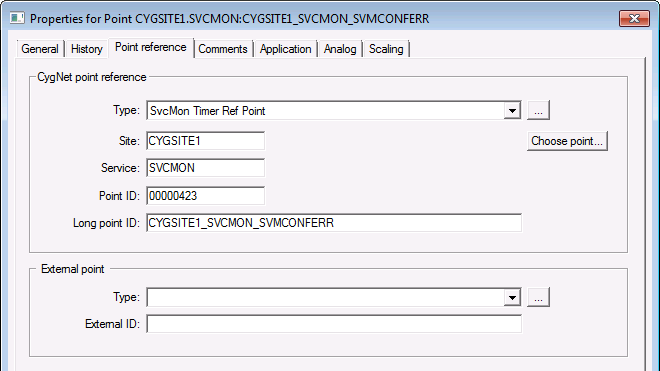
Use the Point reference page to configure the reference properties for a particular point. The properties listed are application specific. They are used by Service Monitoring Service points, Group Rollup points, OPC Interface Service points, evaluator library user points, etc.
|
|
| Sample Point reference page for an Existing Point |
These are the properties shown on the Point reference page in the PNT Editor.
See Token Categories - Point: Point Reference for the corresponding tokens for each property and Filter Attributes - Point: Point Reference for the corresponding filter attributes for each property.
| Property | Description | Default Value |
|---|---|---|
| CygNet point reference | ||
|
Type |
Specifies the type of the reference point. Option is any entry from the CMPNTREF table: for example, Group Averager, Group SYFACINFO Rollup, Group Totalizer, OPC Group Facility, SvcMon Timer Ref Point. |
Blank |
|
Site |
The Site of the reference point. |
Blank |
|
Service |
The Service of the reference point. |
Blank |
|
Point ID |
The Point ID of the reference point. |
Blank |
|
Long point ID |
The Long Point ID of the reference point. |
Blank |
|
Choose point… |
Click Choose Point to select a reference point. |
- |
| External point | ||
|
Type |
The type of external point type. Option is any entry from the CMEXTTYP table with 10 characters maximum. |
Blank |
|
Free-form text up to 256 characters. This property can be used for linking points to an external OPC server. The format is: server_name=<server>; machine_name=<machine> See OPCIS Points, OPCIS Data Points, and OPCIS Groups for more information. Note: When updating point values (via a value edit in CygNet Explorer, using the TextImport EIE, or via a SetPoint object) all changes are pushed through to the associated CVS (UIS, HSS, and OPCIS). In the case of the OPCIS, you cannot do a text import or a setpoint to an OPCIS point if an external OPC server ID is configured (in the External ID field of the Point reference page of the PNT Editor) because any update is routed back through the external OPC server. This makes it impossible to backfill historical data for a tag that "belongs" to an OPC server. |
Blank |
|

|
|
|

